One account, every market
FX, CFDs, equities, crypto and metals on one engine and one login, so a client never has to switch platforms.
ActTrader / Trading platform
Give clients a trading experience with your name on it. Try your brand on the real ActTrader multi-asset platform below, then see how desktop, web and mobile work together.
Kept in this browser only. Nothing is sent to us.
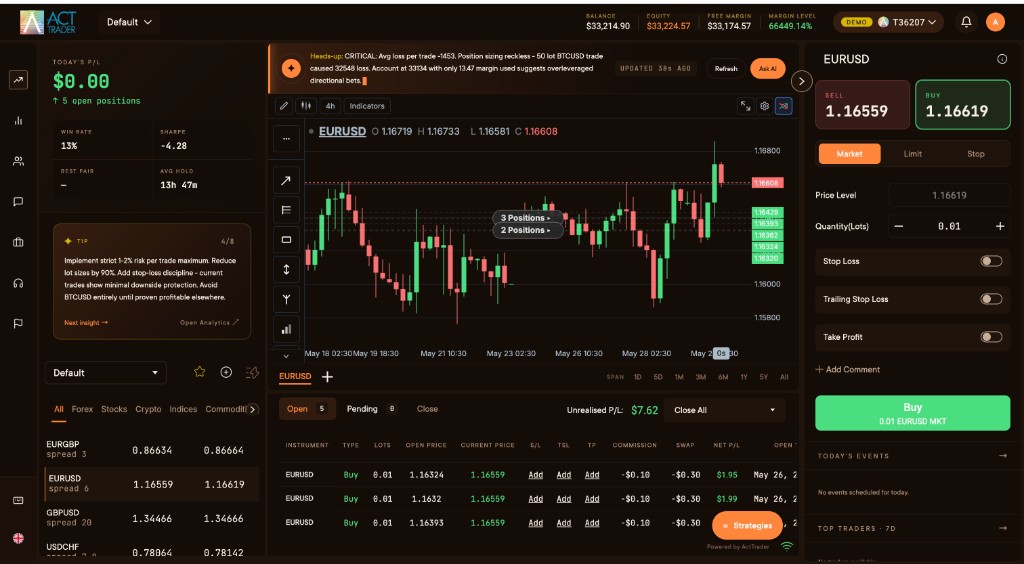
The live platform on a demo account · Illustrative account data
Built around your business
Give clients a workspace for discovering markets, analysing price and managing their trades. Behind it, your team runs the business on the same foundation.
FX, CFDs, equities, crypto and metals on one engine and one login, so a client never has to switch platforms.
Indicators, drawing tools and trading from the chart, powered by ActCharts. Drag a line to move a stop.
The order ticket shows the trade’s risk and required margin before your client places it.
The Smart Trading Assistant answers questions about performance, risk and positions in plain English, from live account data.
Three applications. One account.
Every application connects to the same account, so your clients pick up where they left off, wherever they are.
Desktop
The new ActTrader desktop application, for clients who trade all day from one screen.
Recorded in the ActTrader desktop application · Illustrative account data
WebTrader
Nothing to install. Clients sign in at your domain and trade with the full workspace.
Actual WebTrader footage · Demo account
Mobile
All-new mobile apps that put Forex, Stocks and Crypto CFDs in one market watch.
CRM, built in
ActTrader includes a native CRM for onboarding, KYC/AML, account management, IB tracking and client communications. No separate system to buy or connect.
A client registers once and can use every ActTrader product line from the same place, without switching to another portal.
Checks are built in, with document upload, review queues and an audit trail.
Onboard a client once, fund them once, and route them into every product line, with one ledger, shared KYC and shared margin.
Multi-level IB and affiliate commission structures, with real-time attribution.
Client withdrawals, IB commissions and partner payouts run on one payment rail, with approval workflows and treasury limits. Every movement lands in one ledger.
Your logo, colours, domain and email templates across every client-facing and admin interface, with multi-language support.
Open the client side of the CRM in the live platform:
For the people running the business
Your clients have their platform. Your team has its own dealer environment: A-book, B-book and hybrid execution on one margin engine, with a real dealer desk.
Launching with ActTrader
Forex and multi-asset trading under your brand, with the CRM included. Here is what your team will ask before signing.
4–8 weeks
A new brokerage, exchange or prop firm launching from scratch on ActTrader goes live in four to eight weeks.
Under 30 days
A broker moving from an existing trading platform can be live in under 30 days. Already on ActTrader? Move to the new ActTrader on the same foundation, with no migration project.
The full stack
Terminals, dealer tools, CRM, risk engine and APIs, under your brand and domain. Onboarding, KYC/AML, IB tracking and client communications are built in.
On the call
Pricing depends on the products and markets you launch. We take you through it on your demo call.
Want to look first? Anyone can open a demo account with demo funds at trade.acttrader.com.
No. Forex is one business line on ActTrader, alongside investing, a crypto exchange and payments. A client registers once and can use every product line you run.
Desktop, WebTrader in the browser, and mobile apps, all on one engine and one login.
Yes. The dealer application is separate from the client apps and is built for your operating team.
A new brokerage can go live in four to eight weeks. A broker moving from another platform can be live in under 30 days.